

Knowledge bases
A knowledge base holds the details your agent should know but that do not belong in its instructions: FAQs, prices, policies, opening hours. You add it once and attach it to any agent, voice or chat. The agent then searches it to answer questions.
You will need: your documents as PDF, DOCX, TXT or MD files, or text you can paste.
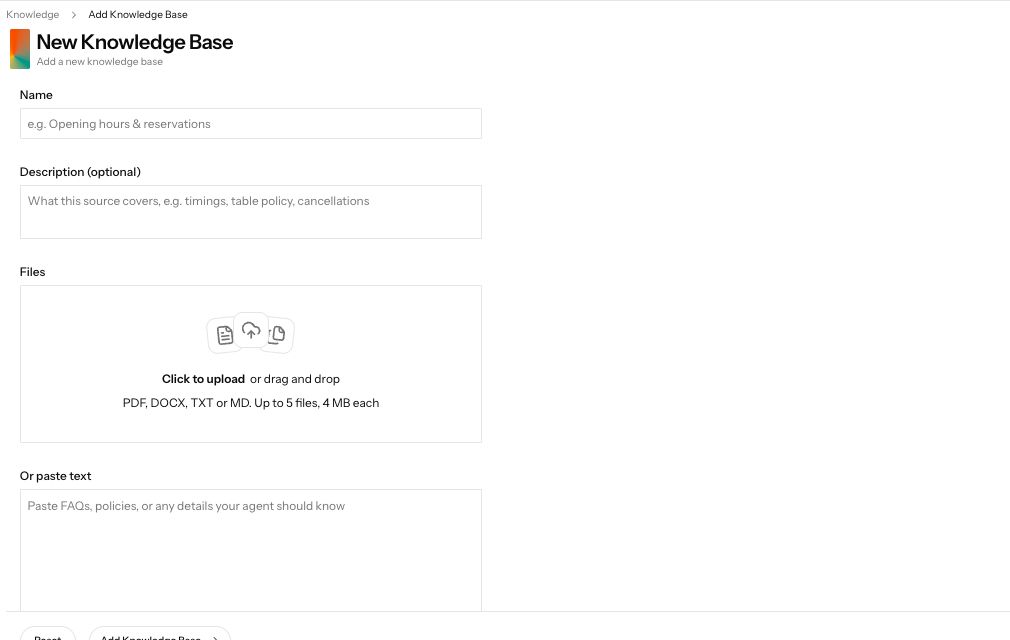
Demonstration data. The New Knowledge Base form accepts files or pasted text.
1. Add a knowledge base
Section titled “1. Add a knowledge base”Open Knowledge in the sidebar and press Add Knowledge Base. Fill in:
| Field | What to enter |
|---|---|
| Name | What it covers, for example “Opening hours and bookings”. |
| Description (optional) | A line on what is inside. |
| Files | Up to 5 files, 4 MB each: PDF, DOCX, TXT or MD. |
| Or paste text | Paste FAQs or policies directly, instead of or as well as files. |
Press Add Knowledge Base.
2. Wait until it is ready
Section titled “2. Wait until it is ready”Back on Knowledge Bases, the new entry shows its Status. It is processed in the background; when it is ready, you can attach it.
3. Attach it to an agent
Section titled “3. Attach it to an agent”Open the agent, open Knowledge Bases, and pick from Select knowledge bases. Attached ones show as small tags; remove one with its cross, or press Clear to remove all. Press Save on the agent.
4. Test it
Section titled “4. Test it”Ask the agent a question that only the document answers, on a web call for a voice agent or in the widget preview for a chat agent.
Common failures
Section titled “Common failures”Add Knowledge Base says "Upload at least one file or paste some text"
A knowledge base needs content. Upload a file under Files or paste text under Or paste text.
The status shows failed
The file could not be read. Check it is a PDF, DOCX, TXT or MD file under 4 MB, delete the entry and add it again. If it fails again, paste the text instead.
I need to change a document
Knowledge bases cannot be edited yet. Add a new one with the updated content, attach it to your agents, then delete the old one. Deleting cannot be undone, and agents using it stop finding its content.
My agent's instructions are over the character limit
Move long product details, price lists and policies out of Agent Task into a knowledge base, and attach it to the agent.
Next steps
Section titled “Next steps”- Catalogue: let the agent look up products and prices.
- Write your agent: keep the instructions short.
- Test your agent: check the answers.